When a schedule containing one or more Run Of Station (ROS) schedule lines is revised or canceled in the middle of a week, a question arises as to the disposition of ROS ads.
By definition, the number of ROS ads broadcast on each specific day of the week is undetermined until after the day is complete. For example, consider a schedule of 5 ROS ads to air Monday thru Friday in a given week. The media schedules these ads as time is available. The exact number of ads airing each day is unknown until the day ends.
If a schedule cancellation or revision occurs other than on Monday, COMPASS (and you) have no way of knowing the number of ads that have been aired prior to the effective revision date.
If the schedule is canceled, then it is obvious that no ads aired following the cancellation date. However, if it is a revision, some ROS ads might air before the revision date while others air after. In order to deal this this issue, COMPASS can "split" (duplicate) ROS lines for mid-week revisions into two lines: one prior to the revision date and another (immediately below the original line) to cover the period after the revision date thru the remainder of the week.
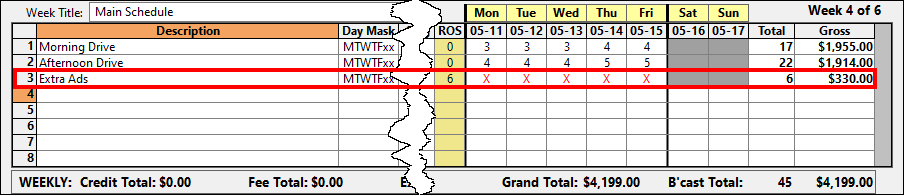
ROS Schedule Line Before a Weekday Revision
When COMPASS detects one or more ROS lines being affected by a mid-week revision, an alert message is displayed offering to provide detailed help (this help topic) on the option available to split the ROS lines.
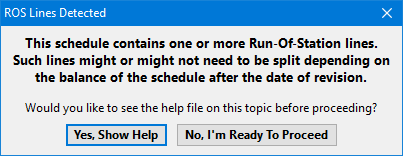
ROS Line Split Alert
Once you are ready to proceed with the revision, COMPASS will ask if you want to split the ROS lines or leave them unchanged.
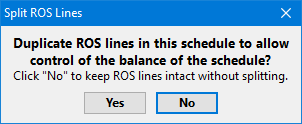
ROS Line Split Option
If the response is Yes, the ROS lines affected will be duplicated. If no ROS ads will air for the remainder of the week following the revision date, there is no need to split the lines. This dialog gives you the option to choose how you want to handle the ROS portion of the revision depending on the individual circumstances.
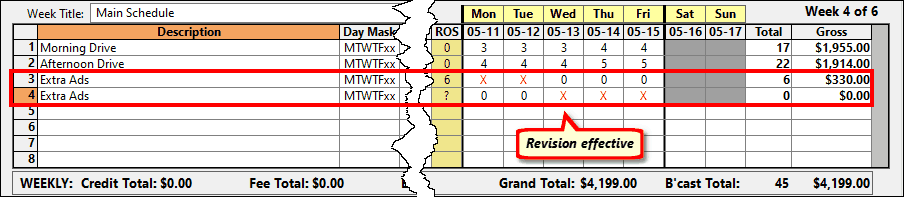
ROS After Revision (Split Into Two Lines)
Based on the revision date, the ROS line duplication alters the selected days as shown in the image above. In this example, the revision is effective 5/13. The second (duplicated) ROS line has removed the red X on 5/11 and 5/12, as those days are prior to the revision date. The original ROS line (line 3) has converted to no ROS ads on 5/13, 5/14, and 5/15, as this covers the effective date of the revision and the days after.
The new ROS line (line 4) has a question mark (?) in place of a number, indicating the number of ads broadcast beginning 5/13 -- the revision date -- is unknown. The two lines should be edited to reflect the correct number of ads that will be broadcast. This might require contacting the media to obtain the actual schedule information.
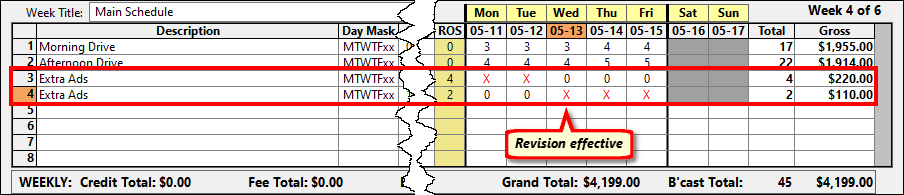
ROS Lines After Manual Adjustment
If the revision is effective on a Monday, the ROS line split option is not displayed, as there is no mid-week change.